If you’ve ever bought crypto online, you’ve likely come across MoonPay—a super easy way to buy Bitcoin, Ethereum, and other digital assets. But here’s the kicker: those convenience fees can add up fast!
Understanding MoonPay Fees is key to making the most of your money in the crypto market. Whether you’re a beginner dipping your toes into crypto or an experienced trader, knowing what fees to expect and how to reduce them can save you a lot over time.
Let’s break down what these fees are, how they work, and some insider hacks to keep more of your hard-earned cash in your pocket while still making seamless transactions.
MoonPay is popular because it simplifies the crypto buying process. Instead of navigating complex exchanges, users can purchase digital assets with familiar payment methods such as debit cards, credit cards, bank transfers, Apple Pay, or Google Pay. This convenience is one of MoonPay’s biggest strengths, especially for beginners who want a smooth and quick entry into the crypto market.
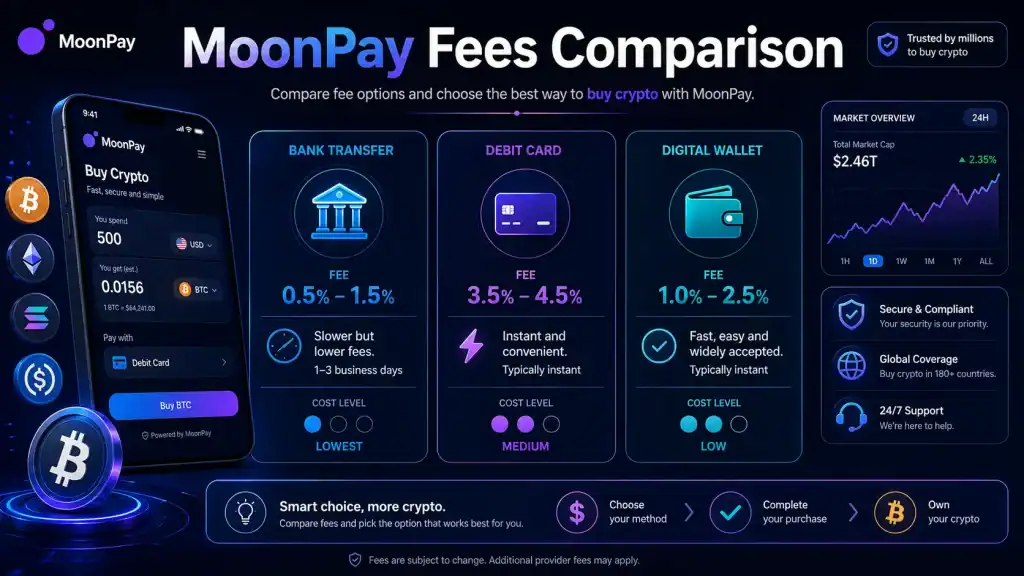
However, convenience often comes with a cost. MoonPay Fees may include processing fees, network fees, card-related charges, and sometimes exchange-rate spreads. These charges are usually shown before checkout, but many users still overlook them because they focus only on the amount of crypto they want to receive. Over time, even small fee differences can affect your total investment value, especially if you buy crypto frequently.
That is why understanding the full fee structure matters. When you know how MoonPay Fees work, you can compare payment options, choose better transaction timing, and avoid paying more than necessary. A smart buyer does not only look at speed and convenience; they also check the final amount received after all fees are deducted.
Materials or Tools Needed
Before you dive into buying crypto, here’s what you need to have on hand:
| Item | Purpose |
|---|---|
| A MoonPay Account | Required to purchase crypto |
| Payment Method | Credit/Debit Card, Bank Transfer, or Apple/Google Pay |
| Digital Wallet | To store your purchased cryptocurrency |
| Network Fee Awareness | Varies depending on blockchain congestion |
With these essentials in place, you’re ready to go! Now, let’s talk about how these fees work and how to keep them as low as possible.
It is also helpful to have a clear buying plan before starting a transaction. Decide how much crypto you want to buy, which payment method you prefer, and where you plan to store your assets. A personal wallet gives you more control over your crypto, while keeping assets on a platform may be simpler but less flexible.
You should also check whether your bank supports crypto-related purchases. Some banks may decline card payments or apply extra charges for crypto transactions. This can make your final cost higher than expected. Before using MoonPay, make sure your payment method is active, verified, and approved for online purchases.
Another useful tool is a blockchain fee tracker. Since network fees change throughout the day, checking current blockchain activity can help you avoid expensive transaction periods. For example, if Ethereum network activity is high, waiting for a quieter period may reduce your total cost.
MoonPay Fees: Instructions
1. Understanding Processing Fees
When you buy crypto through MoonPay, you’re charged a processing fee, which is usually between 3.5% and 4.5% for credit and debit cards. If you use a bank transfer, fees are much lower—around 1% or even free, depending on your bank.
Processing fees are the charges MoonPay applies for handling your payment and completing the purchase. These fees help cover payment gateway costs, fraud prevention, compliance checks, and transaction processing. Card payments usually cost more because they are faster and involve more risk for the payment provider.
Credit and debit cards are convenient because transactions are often completed quickly. This makes them useful when you want to buy crypto immediately. However, they are rarely the cheapest option. If your goal is to reduce MoonPay Fees, bank transfers are usually a better choice, even if they take longer to process.
Before confirming your purchase, always compare how much crypto you will receive using different payment methods. A card payment may complete within minutes, but a bank transfer may give you a better final amount after fees. This small comparison step can help you save money, especially on larger purchases.
2. Factoring in Network Fees
In addition to MoonPay’s processing fee, there’s also a network fee—this is the cost of processing transactions on the blockchain. These fees change based on congestion.
For example:
- Ethereum (ETH) transactions tend to have higher fees during peak hours.
- Bitcoin (BTC) transactions are more stable but can still fluctuate.
- USDT (Tether) fees vary depending on whether you use the Ethereum or Tron network.
Network fees are not controlled entirely by MoonPay fees. They are linked to the blockchain used to process your transaction. When many people are sending transactions on the same network, fees can rise because users compete to have their transactions confirmed faster.
For example, Ethereum-based tokens can become expensive to move during periods of heavy activity. If you are buying stablecoins such as USDT or USDC, the network you choose can make a big difference. Some networks are cheaper and faster, while others may be more widely supported but cost more.
Before buying, check which blockchain network your wallet supports. Sending crypto to the wrong network can cause delays or even result in lost funds. This is especially important for tokens that exist on multiple blockchains. Lower fees are useful, but network compatibility should always come first.
3. Payment Methods and Their Impact on Fees
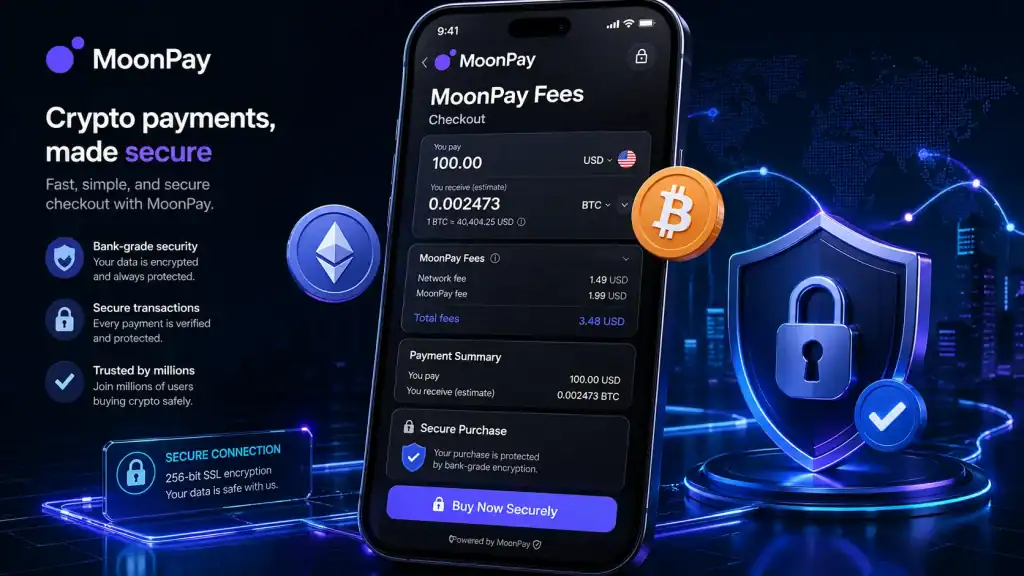
The payment method you choose plays a huge role in how much you pay in fees.
| Payment Method | Processing Fee | Pros | Cons |
|---|---|---|---|
| Credit/Debit Card | 3.5% – 4.5% | Fast and easy | High fees |
| Bank Transfer | 1% (sometimes free) | Low fees | Slower processing |
| Apple/Google Pay | Similar to cards | Convenient | High fees |
4. Completing a Transaction with MoonPay
Once you’ve selected your crypto and payment method:
- Enter your details and verify your identity (first-time users).
- Select the amount of crypto you want to buy.
- Check the total fees before confirming your purchase.
- Complete the transaction and transfer your assets to your wallet.
MoonPay Fees: Tips and Warnings
Tips to Reduce MoonPay Fees
| Tip | Why It Works |
|---|---|
| Use bank transfers | Lowest processing fees |
| Buy larger amounts | Reduces percentage-based fees |
| Time your purchases | Avoid peak congestion times for lower network fees |
| Look for promotions | MoonPay occasionally offers fee discounts |
Common Mistakes to Avoid
- Ignoring network fees: These vary depending on blockchain congestion.
- Using credit cards frequently: Higher fees can make transactions costly.
- Buying small amounts too often: Fees take up a bigger percentage of smaller transactions.
Conclusion
MoonPay is a fantastic tool for crypto investors, but it’s crucial to understand how MoonPay Fees work so you’re not paying more than necessary. By choosing the right payment method, timing your transactions wisely, and avoiding unnecessary charges, you can keep more of your money while still making smooth crypto purchases.
FAQ
Are MoonPay Fees different depending on the country?
Yes! MoonPay’s fees can vary by region due to local banking regulations and payment processing costs. Always check your country’s specific rates before making a purchase.
How can I check the exact MoonPay Fees before buying crypto?
MoonPay displays a detailed breakdown of all fees before you confirm your purchase. Be sure to review this before proceeding.
What’s the best way to minimize MoonPay Fees?
The best way to save on MoonPay Fees is by using bank transfers, purchasing larger amounts at once, and making transactions during off-peak hours when network fees are lower.
Resources
- Changelly. What is MoonPay and How Does It Work?
- Bitcoin.com. How to Use MoonPay Balances
- The Paypers. MoonPay Launches MoonPay Balance in the US
- Exodus. How to Buy Crypto with MoonPay
- Canvas Business Model. MoonPay: How It Works