
Have you ever wondered what makes a gaming PC load faster, or how your laptop handles massive video files without breaking a sweat? Meet PCIe, the silent hero inside your machine. Short for Peripheral Component Interconnect Express, it is one of the unsung backbones of modern computing, quietly accelerating everything from graphics to storage and even AI processing.
When I built my first custom PC, I had no clue what it even did — until I tried installing a graphics card and found it wouldn’t fit into just any socket. That’s when I realized this little interface was a big deal. Fast forward a few years, and every serious hardware upgrade I’ve made — from adding blazing-fast SSDs to installing GPUs that could run the latest triple-A titles — all came down to its compatibility.
In the ever-evolving world of futuristic technology, where speed and connectivity matter more than ever, it plays a starring role. Let’s explore why this piece of tech is crucial in today’s digital landscape.
What is PCIe?
Peripheral Component Interconnect Express, is a high-speed interface standard used to connect various hardware components to a computer’s motherboard. It’s the digital highway that allows key components — like graphics cards, solid-state drives, and network adapters — to communicate with the CPU quickly and efficiently.
In simpler terms, itis the express lane in your PC’s motherboard, ensuring the smooth, uninterrupted flow of data between critical components.
Synonyms or variations for PCIe include PCI Express, PCI-E, or expansion slot technology. While these names vary slightly, they all refer to the same game-changing concept — super-fast, low-latency communication between your hardware and your processor.
Breaking Down PCIe
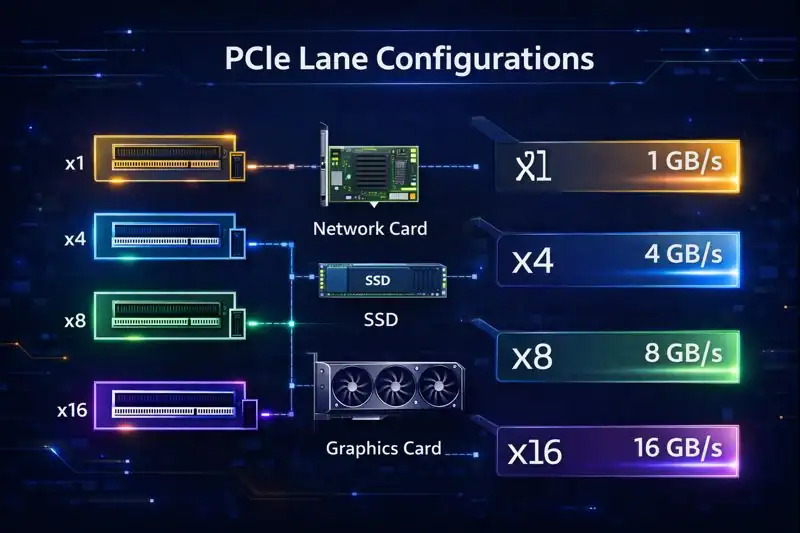
Let’s pull open the hood and break down how PCIe is built and what makes it tick:
- Lanes:
Think of each PCIe connection as a multi-lane highway. The more lanes a slot has (x1, x4, x8, x16), the more data it can transfer at once. For instance, a graphics card typically uses an x16 slot to maximize performance. - Slots & Cards:
PCIe slots are where you plug in devices like GPUs, SSDs, or Wi-Fi cards. The size of the slot matches the number of lanes. A longer slot = more lanes = higher bandwidth. - Versions:
It evolves in generations — Slots 3.0, 4.0, 5.0, and now 6.0. Each version doubles the data transfer rate of the previous one. 4.0, for example, can transfer up to 16 GT/s (gigatransfers per second) per lane! - Compatibility:
Here’s the good news — It is backward and forward compatible. So even if your device is built for PCIe 4.0, it can still work in a 3.0 slot, just at a slower speed.
A good example? Installing a new NVMe SSD that uses PCIe lanes instead of the slower SATA interface — you immediately notice the performance difference. It’s like switching from a moped to a race car.
History of PCIe
The evolution of the component is a story of constant improvement, aiming for faster speeds, lower latency, and more efficiency with every generation.
| Year | Milestone |
|---|---|
| 2003 | 1.0 launched, replacing older PCI and AGP slots |
| 2007 | 2.0 doubled data rate to 5 GT/s |
| 2010 | 3.0 introduced 8 GT/s speeds with improved encoding |
| 2017 | 4.0 doubled bandwidth to 16 GT/s |
| 2019 | 5.0 launched with 32 GT/s capability |
| 2022 | 6.0 introduced with up to 64 GT/s per lane |
| 2025+ | 7.0 expected with even higher efficiency for next-gen workloads |
This constant evolution keeps it relevant in a world of advanced technology, where data demand continues to skyrocket.
Types of PCIe
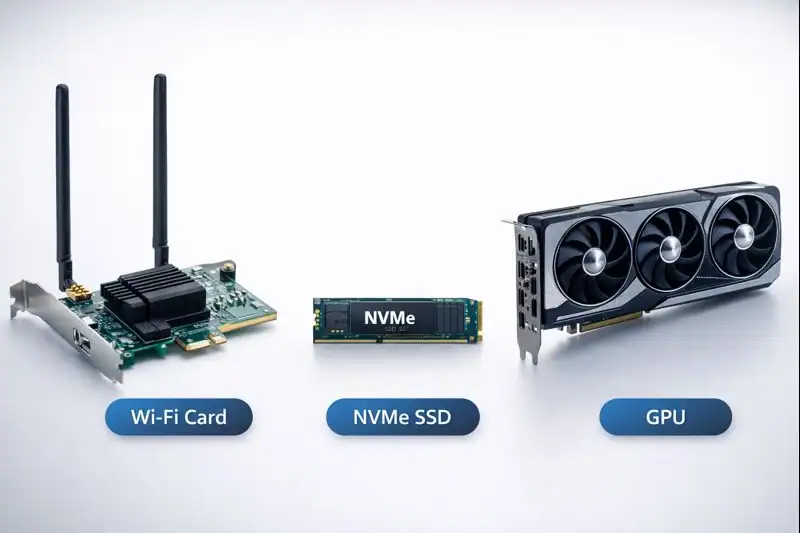
Depending on what kind of performance and usage you’re aiming for, PCIe comes in several types based on both physical slots and data lanes.
x1
This smallest form factor is usually reserved for add-ons like USB expansion cards, sound cards, or network adapters.
Example: Adding a Bluetooth/Wi-Fi card to your desktop via a x1 slot.
x4
Often used by NVMe SSDs and some RAID controllers, these offer a solid balance of performance and efficiency.
Example: A Samsung 980 Pro NVMe SSD using an x4 lane for fast storage access.
x8
Mid-range slot that can be used for networking cards or secondary GPUs.
Example: Dual GPU setups where the secondary card runs on an x8 slot.
x16
This is the heavyweight champion, often used for graphics cards, AI accelerators, and other bandwidth-hungry components.
Example: An NVIDIA RTX 4090 plugged into a x16 slot for maximum rendering power.
How Does PCIe Work?
Let’s take a look at how it works in a simplified step-by-step breakdown:
Step 1: Detection
When you boot your computer, the BIOS or UEFI firmware checks the slots to detect which devices are connected — like a GPU or SSD.
Step 2: Handshake
Each connected device performs a “link training” to establish the lane width and slot version supported. Think of it as two devices agreeing on how fast they can talk.
Step 3: Data Transfer
Once communication is established, data is transferred over the lanes in packets — similar to how data travels across the internet. The more lanes, the faster the transfer.
Step 4: Dynamic Management
Modern slots versions manage power dynamically and can throttle bandwidth up or down based on need, improving efficiency — especially critical for laptops and iot devices.
This seamless process allows your components to communicate at lightning speed — enabling that ultra-responsive experience you love.
Pros & Cons
Let’s weigh the strengths and limitations of PCIe:
| Pros | Cons |
|---|---|
| Extremely high data transfer speeds | Newer versions require compatible hardware |
| Scalable lane configurations (x1 to x16) | Can generate heat in high-performance setups |
| Backward and forward compatibility | Confusing for beginners to match slots/devices |
| Supports a wide range of components | Larger components may block adjacent slots |
| Constant innovation with each generation | Upgrading can be costly |
Despite a few technical hurdles, PCIe remains the gold standard for high-performance component connectivity.
Uses of PCIe
It powers a wide range of hardware applications — from gaming to deep learning. It’s everywhere, even if you’ve never seen it.
Gaming & Graphics
Most high-end GPUs rely on PCIe x16 to deliver rich visuals, fast rendering, and silky-smooth frame rates. Whether you’re gaming at 4K or running VR, PCIe ensures your graphics card doesn’t bottleneck.
Example: A gaming rig with a Radeon RX 7900 XTX running through 4.0 to achieve optimal performance in Cyberpunk 2077.
Storage & Speed
Modern SSDs using the NVMe protocol leverage PCIe lanes to deliver read/write speeds 5–7x faster than SATA drives. That means quicker boot-ups, blazing-fast file transfers, and seamless multitasking.
Example: Video editors using NVMe SSDs on PCIe 4.0 for editing 8K footage in real time.
Artificial Intelligence & Machine Learning
AI accelerators and specialized GPUs rely on the slot to process complex models with minimal latency. In the age of big data, PCIe’s bandwidth becomes mission-critical.
Example: AI researchers using PCIe-connected Tensor Processing Units (TPUs) to speed up model training.
Networking & Communication
High-speed network interface cards (NICs) use PCIe x4 or x8 slots to manage large data transfers across enterprise-level networks.
Example: Cloud servers relying on 100GbE NICs via PCIe for lightning-fast data throughput.
Expansion & Customization
From capture cards to RAID controllers, it allows users to customize their systems for specific tasks without needing to buy a whole new motherboard.
Example: Content creators adding a 4K capture card to stream and record gameplay simultaneously.
Resources
Want to learn more? Check out these top-notch resources:
- Intel – PCI Express* Architecture
- Tom’s Hardware – PCIe Explained
- PCMag – PCIe Guide for Beginners
- Medium – Unveiling PCIe 6.0: A Leap Forward in High-Speed Connectivity
- TechSpot – PCIe 4.0 vs. PCIe 3.0 SSDs Benchmarked
