
Imagine a world where repetitive tasks don’t drain your energy and your team can focus on big-picture ideas. That’s the reality many forward-thinking companies are discovering with n8n, a game-changing workflow automation tool making waves in the realm of technology trends. In a day and age of futuristic technology and advanced technology, mastering automation is no longer a luxury — it’s essential. Whether you’re a developer, business owner, or productivity enthusiast, it offers an exciting bridge between data sources and meaningful action. In this blog post, we’ll take a deep dive into what n8n is, how it works, and why it’s become such a valuable asset in modern digital ecosystems.
For many of us, daily digital routines involve repetitive steps: moving data between systems, triggering notifications, updating databases, and more. I used to spend hours every week copying data across apps — hours I now reclaim thanks to the platform. It’s like having an invisible assistant that never sleeps, connecting ideas, tools, and outcomes with elegant simplicity. Let’s embark on this journey together to understand the true potential of n8n and why it’s one of the most talked-about tools in the automation landscape today.
What is n8n?
At its core, the AI (pronounced “n-eight-n”) is an open-source workflow automation platform that lets you visually connect apps and services to create automated processes. Think of it as a canvas where you can drag, drop, and link the building blocks of your digital life, turning them into seamless, intelligent workflows.
It stands for “nodemation,” a fusion of nodes and automation, representing how workflows are structured through connected nodes. Some people describe n8n as the “glue” that binds different systems together, much like how APIs, scripts, and connectors interact to synchronize data and actions across platforms.
Synonyms and variations you might encounter include workflow automation platform, integration orchestrator, or visual automation tool, but it remains the unifying term that ties all these ideas together wonderfully.
Breaking Down n8n
To appreciate what it really brings to the table, let’s peel back the layers and look at its key components:
- Nodes – These are the individual building blocks in n8n workflows. Each node performs an action, such as sending an email, fetching data from an API, or manipulating text. Picture each node as a worker with a specialized task.
- Workflows – A workflow is a series of nodes connected in a meaningful sequence. It might start with receiving a message from an iot device, process the data, and then notify a team on Slack — all without human intervention.
- Triggers – Workflows often start with a trigger, such as a webhook, schedule, or event from another app. Triggers are what make automation reactive and timely.
- Integrations – It supports hundreds of integrations, connecting popular services like Google Sheets, GitHub, Airtable, and custom REST APIs. You can treat n8n as your personal “integration hub.”
For example, imagine automatically logging every new sale in your online store to a spreadsheet, then sending a personalized thank-you message. That entire chain — from sale to message — can be orchestrated within n8n.
History of n8n
Understanding the origin story of n8n helps us appreciate its community-driven spirit and evolution.
| Year | Milestone |
|---|---|
| 2019 | It is created by Jan Oberhauser as an open-source workflow automation tool with a focus on flexibility and extensibility. |
| 2020 | The platform gains traction among developers seeking alternatives to proprietary automation tools. |
| 2021 | It releases major updates, significantly expanding node libraries and integration capabilities. |
| 2022 | Growing adoption in enterprises and startups alike; expanded documentation and community contributions. |
| 2023–2025 | Ongoing releases improve user experience and introduce more advanced features, solidifying n8n’s place in the automation ecosystem. |
From humble beginnings to robust global usage, it has always championed openness and adaptability, drawing users who crave control over closed, rigid systems.
Types of n8n
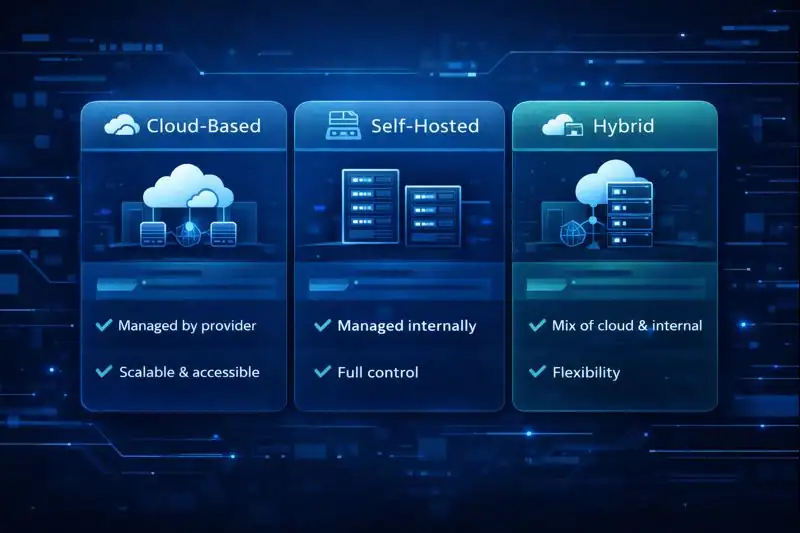
When people talk about it, they usually refer to different ways the platform can be deployed and utilized:
Cloud-Based
Cloud-based n8n is hosted by the service provider, giving you quick setup and easy accessibility without worrying about server maintenance. Ideal for teams who prefer managed infrastructure and want to get started fast.
Self-Hosted
For those who crave full control, self-hosting is the way to go. You install the platform on your own servers — physical or virtual — which gives you maximum privacy and customization. Developers often prefer this for security-sensitive workflows.
Hybrid
Hybrid deployment bridges cloud convenience and self-hosted control. A business might self-host the core automation engine but use cloud services for certain triggers or integrations.
Each type offers a unique balance between control, convenience, and performance. Your choice depends on your technical comfort level and strategic priorities.
How Does n8n Work?
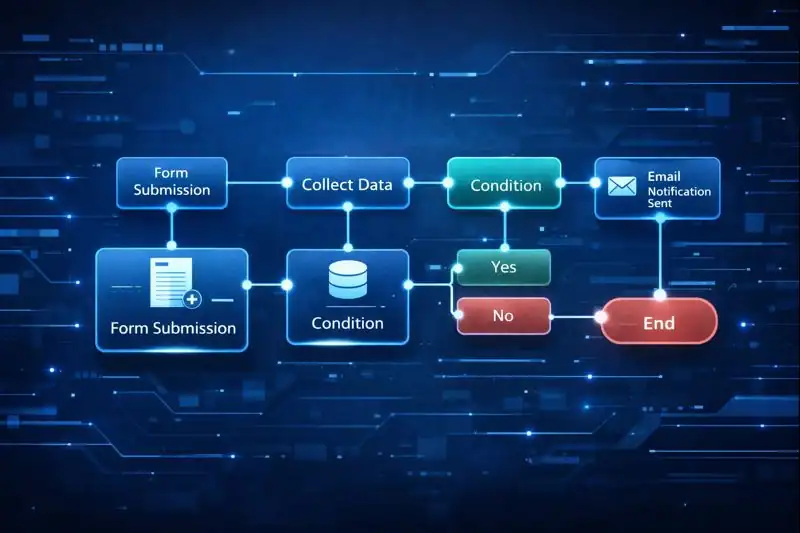
Imagine it as a smart conductor, orchestrating tasks across different digital instruments. Here’s a step-by-step look at how it typically works:
First, you define a trigger — perhaps a webhook from your online form or a scheduled time every morning. That trigger tells the website to start listening for specific events.
Next, you chain together nodes that represent each step in your workflow. Each node might read data, transform it, or connect to a third-party service. You decide the flow based on your needs.
Then, as data flows through your sequence, it evaluates conditions — like a filter or switch — to determine the next step. It’s like setting up multiple routes on a road trip; you choose the turns based on real-time conditions.
Finally, the last node completes the action — such as sending an email, updating a database, or triggering a notification. At each step, it logs activity, making it easier to debug or optimize your workflows over time.
This step-by-step orchestration turns complex workflows into manageable, automated sequences that operate reliably behind the scenes.
Pros & Cons
Workflow automation with n8n is exciting, but no tool is without trade-offs. Below is a balanced look at what makes it so compelling — and where it might fall short.
| Pros | Cons |
|---|---|
| Extensive integration library | Learning curve for beginners |
| Open-source and highly customizable | Self-hosting can require technical expertise |
| Visual workflow builder simplifies automation | Some advanced features require manual configuration |
| Strong community and documentation | Cloud plan has usage limits |
| No-code/low-code approach empowers non-developers | Debugging complex workflows can take time |
In short, n8n shines in flexibility and breadth, though its depth can be a hurdle for complete automation newcomers.
Uses of n8n
What can you actually accomplish with n8n? The possibilities are vast — let’s explore some real-world use cases across industries.
Lead Management and Marketing Automation
Many businesses use n8n to automate lead capture and nurturing. For example, when a visitor fills out a contact form, n8n can instantly validate the data, update a CRM, and send a personalized welcome email — all without manual input. This not only saves time but improves response times, boosting conversions and customer satisfaction.
E-commerce Order Processing
In e-commerce, speed and accuracy matter. n8n can sync order data from your storefront to inventory systems, generate invoices, and even alert shipping teams. It prevents errors that often occur with manual order entry, creating a smoother fulfillment experience.
IT Monitoring and Notifications
Tech teams can build workflows in n8n that monitor infrastructure, report anomalies, and notify on-call engineers. In combination with monitoring services, this creates proactive alerting systems that help resolve issues before end users even notice.
Content & Social Media Publishing
Content creators love automation because it frees up creative energy. With n8n, you can schedule posts, recycle evergreen content, and even pull analytics into dashboards. From blog updates to social feeds, automation helps maintain consistency across platforms.
Data Synchronization & Reporting
Data resides in many places — spreadsheets, databases, cloud services. n8n ties these together beautifully, syncing records and generating reports that update in real-time. Finance teams, data analysts, and operations leaders benefit from having current figures without manual exports and imports.
These are just a few examples of how n8n is used across industries. Each implementation unlocks productivity while empowering teams to focus on value-driven work.
Resources
- n8n – n8n Docs
- Hatchworks AI – No-Code Workflow Automation with n8n from Scratch: A 48-Hour Build
- Medium – Part 1: Introduction to n8n
- Hostinger – Deploy n8n in 1-click
- Arimetrics – What is n8n?
