
Let’s say you’re in your favorite coffee shop, sipping a caramel macchiato, and you get a text: “Your package has been delivered.” You didn’t open an app. You didn’t click anything. It just happened. That magical moment? It was likely powered by a humble yet powerful piece of advanced technology—a webhook.
In today’s fast-paced digital world where futuristic technology drives everything from social media to IoT devices, staying in the loop instantly isn’t just nice—it’s necessary. That’s where this tiny tech hero steps in. In this blog, we’ll unwrap the mystery behind webhooks, show how they work, where they came from, and why they’re critical for the seamless, real-time experiences we often take for granted.
So grab your coffee, and let’s dig into the marvel of webhook.
What is a Webhook?
It is a digital messenger—an automated, real-time communication tool that sends data from one system to another when an event happens. Think of it as a digital carrier pigeon that flies off only when needed, without any human interference.
Some call it an “HTTP callback” or “reverse API.” While those names sound intimidating, the concept is pretty simple: you tell a service, “When X happens, notify me here,” and boom—it does. No polling, no refreshing, just fast, efficient communication.
Imagine setting up a security camera that automatically sends a snapshot to your phone the moment motion is detected. That’s the magic in action.
Breaking Down Webhook
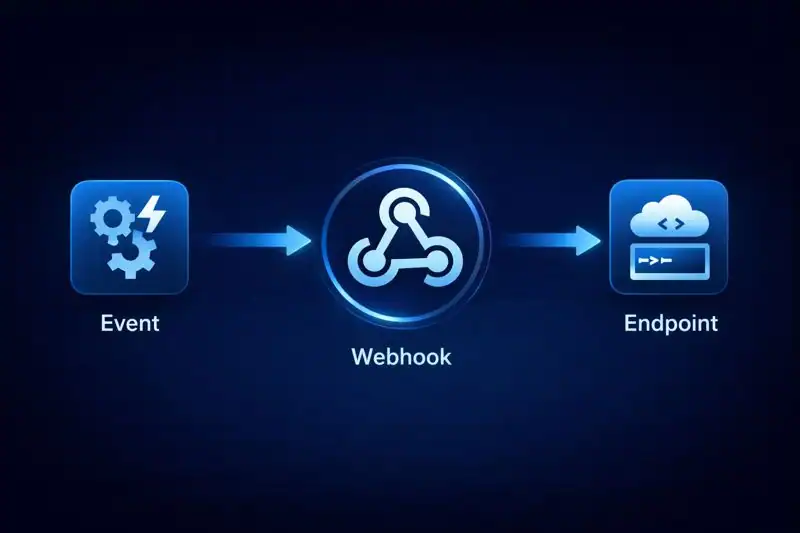
At its core, it has three main components:
- Triggering Event – This is the spark. It could be a user signing up, a transaction happening, or a file being uploaded.
- Payload – The actual information being sent. Think JSON format containing details of the event.
- URL Endpoint – The destination that receives the data.
For example, let’s say your online store makes a sale. Your payment processor can instantly send a webhook to your inventory system saying, “Hey, subtract one unit from stock!” That real-time interaction makes everything faster and smarter.
Here’s a real-world anecdote: While building a Shopify plugin for a startup, I remember realizing we didn’t need constant checks for order status. One webhook shaved hours of unnecessary checks and even made the app feel “alive.” That was the day I truly appreciated what webhooks could do.
History of Webhook
The idea of event-driven programming isn’t new. In fact, the concept behind webhooks predates modern APIs. Developers were always looking for more efficient ways to connect systems without dragging down performance.
| Year | Milestone |
|---|---|
| 2007 | Jeff Lindsay coins the term “webhook” |
| 2011 | GitHub popularizes webhooks for repositories |
| 2015 | Major SaaS apps like Slack and Stripe integrate webhook support |
| 2020+ | It become industry-standard in cloud services and new inventions |
While they started as a developer curiosity, webhooks have now grown into a vital part of innovation in connected applications.
Types of Webhook

Incoming
This type is used when an external application needs to send data into your system. Imagine a payment processor like Stripe letting your site know that a customer just completed a transaction. Instead of your system constantly checking for updates, it gets notified instantly—saving time and computing power.
Outgoing
Here, the roles are reversed—your application pushes data out to another service. For example, a blog platform can alert Slack every time a new post goes live. It’s a great way to keep multiple platforms in sync without having to manually update each one.
One-Way
This is the most common setup, where data flows strictly from sender to receiver with no reply expected. It’s perfect for alert systems or real-time notifications, such as when a new user registers and your CRM is updated immediately.
Two-Way
In rare cases, there’s a need for both sending and receiving feedback instantly. For instance, when a delivery app sends tracking info to a merchant and waits for a confirmation to proceed, this interactive model ensures accuracy in critical processes.
Third-Party
Off-the-shelf solutions provided by platforms like Zapier or IFTTT fall into this category. These are ideal for non-developers who want to link services together effortlessly. With just a few clicks, you can automate tasks between hundreds of apps without writing a single line of code.ls with minimal coding.
How Does Webhook Work?
Let’s walk through it like you’re setting up a notification for new email subscribers on your blog.
- Choose an event – e.g., someone signs up for your newsletter.
- Define the endpoint – maybe a Slack channel or a Google Sheet URL.
- Configure – your email service provider will send data when the event occurs.
- Test – use test payloads to see if the right data is delivered.
- Go live – watch it automatically post subscriber details in real-time.
No delay. No constant checking. Just seamless communication.
Pros & Cons
Like any tool in the world of innovation, this one comes with both game-changing advantages and a few important caveats. When implemented thoughtfully, it offers speed, flexibility, and seamless integrations that can feel almost magical. But if you’re not careful with setup and security, you might end up with silent failures or system vulnerabilities. Let’s break it down:
| Pros | Cons |
|---|---|
| Real-time communication | Can fail silently if the endpoint is down |
| Lightweight and fast | Requires good error handling |
| Easy to set up for most platforms | Security must be carefully managed |
| Saves resources compared to polling methods | Debugging can be complex without proper logging |
| Great for IoT devices and automation | Rate-limiting on some platforms may restrict frequency |
Uses of Webhook
It is everywhere—even if you don’t notice them. Let’s dive into some specific industries:
E-commerce
When a customer places an order, it notify shipping providers, update inventory, and alert customer service—all in real-time.
SaaS Platforms
Apps like Zoom or Slack use webhooks to send live notifications, integrate with CRMs, and trigger custom workflows without delay.
Finance and Payments
Services like PayPal and Stripe use webhooks to inform you instantly when a transaction occurs—no need to refresh your dashboard.
Healthcare
When patient data is updated or appointments are scheduled, secure webhooks ensure that third-party systems get updated without delay.
Education Platforms
Learning management systems notify teachers when students submit assignments, helping automate grading workflows.
Smart Homes
Imagine your smart fridge sending a webhook when it detects you’re low on milk—and automatically placing an order. That’s not sci-fi. That’s now.
Resources
- Zapier – Put Webhooks by Zapier to work with AI and enterprise-grade automation
- Twilio – Introduction to Webhooks
- Stripe – Webhooks Documentation
- GitHub – Managing Webhooks
- SendGrid – Event Webhook Overview
