
If you’ve ever peeked inside your computer or even thought about building one from scratch, you might have stumbled across a term that sounds more like a ship captain than a tech essential: the motherboard. So, what is a motherboard and why does it matter in the world of technology trends?
Let me paint you a picture. When I built my first PC in college (and fried my first motherboard), I realized just how crucial this unsung hero was. Without it, all the other high-powered components—the CPU, the RAM, the graphics card—were just… parts. It is the grand conductor in the symphony of your machine, making sure each piece communicates and performs in harmony.
Understanding the it isn’t just for tech nerds or gamers. With futuristic technology and new inventions springing up daily, knowing the fundamentals is an investment in your digital literacy.
What is a Motherboard?
It (also known as a mainboard, system board, or logic board) is the central printed circuit board (PCB) in a computer. It’s where all the components of your computer come together to communicate, exchange data, and function as a cohesive system.
Think of it as the nervous system of your device, coordinating every muscle and brain cell (component) to move and think together.
Breaking Down Motherboard
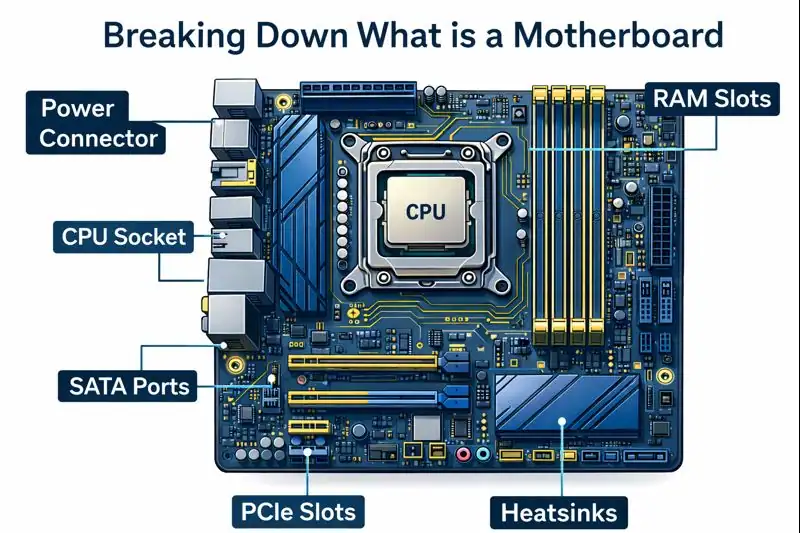
At a glance, the system board might seem like a maze of lines, chips, and slots. But each element plays a pivotal role:
- CPU Socket: This is where your processor lives. It’s the brain of your computer, and the system board is what connects that brain to the rest of the body.
- RAM Slots: These are the memory lanes. Your RAM sits here, temporarily storing data your system needs quick access to.
- Expansion Slots: Want a better sound card or a top-tier graphics card? These PCIe slots are where you install them.
- Chipsets: These act like traffic controllers, ensuring data flows efficiently between components.
- Power Connectors: Feeding energy from your power supply unit (PSU) to every corner of your board.
- Storage Connectors: SSDs and HDDs connect here, giving your system its storage space.
When I first held a board in my hands, I remember being both fascinated and terrified. It felt like handling the brain of a robot. Over time, it became less intimidating and more inspiring.
History of a Motherboard

It has a surprisingly rich history. Here’s a quick glimpse:
| Year | Development |
|---|---|
| 1981 | IBM releases the first system board for personal computers. |
| 1995 | Introduction of ATX form factor by Intel. |
| 2004 | PCI Express becomes standard, replacing older AGP slots. |
| 2010+ | Integration of more functions (e.g., sound, Wi-Fi) into the board itself. |
| Today | Support for iot devices, high-speed RAM, and multiple GPUs. |
Back in the day, the boards were minimal and bulky. Today, they are sleek, compact, and packed with advanced technology.
Types of a Motherboard
Just like cars, system board come in different sizes and capabilities. Choosing the right one depends on your system’s needs, space constraints, and future upgrade plans.
ATX (Advanced Technology eXtended)
This is the standard and most widely used system board format. It offers maximum expansion capabilities, allowing for multiple graphics cards, storage drives, and additional add-on cards. It’s ideal for gamers, creative professionals, and anyone looking to build a powerful workstation.
Best for: High-performance desktops, gaming rigs, workstations.
Micro-ATX
A more compact version of the ATX, micro-ATX boards fit into smaller cases while still offering enough expansion slots for moderate upgrades. They usually support fewer RAM and GPU slots but maintain solid performance for general users.
Best for: Budget builds, general-purpose PCs, home offices.
Mini-ITX
Mini-ITX boards are tiny powerhouses. Designed for ultra-compact systems, they often come with limited slots and ports, but they’re energy efficient and perfect for minimalist builds.
Best for: Small form factor PCs, media centers, space-conscious setups.
Extended ATX (E-ATX)
An expanded version of ATX, the E-ATX is designed for enthusiast and professional-grade setups. It offers even more room for additional RAM slots, GPUs, and high-end cooling solutions.
Best for: Extreme gaming, video editing, and 3D rendering systems.
Server Motherboards
Specifically engineered for enterprise environments, these boards support multiple CPUs, large volumes of ECC RAM, and advanced I/O capabilities. They often come in proprietary form factors suited to server racks.
Best for: Servers, data centers, cloud computing infrastructures.
Laptop Motherboards
Unlike desktops, laptop system boards are compact and often custom-built for each model. They integrate more components (like GPU, RAM) to save space, limiting upgradeability.
Best for: Portable computing with specific hardware constraints.
Each type serves a unique purpose, catering to different tech needs and environments. Whether you’re building a sleek media box or a high-performance beast, there’s a motherboard designed for your goals.
How Does Motherboard Work?
Imagine hosting a party where each guest is a computer component. The motherboard is your event planner. It ensures everyone gets the electricity (power distribution), knows where to sit (component slots), and communicates without chaos (data pathways).
Here’s a step-by-step flow:
- Power is supplied via the PSU to the motherboard.
- The CPU begins processing tasks.
- RAM feeds the CPU quick-access information.
- GPU (if installed) renders visuals.
- Storage devices retrieve or store data.
- Chipsets manage the data traffic among all components.
Every second your computer is on, your motherboard is working tirelessly behind the scenes, ensuring all parts talk to each other efficiently.
Pros & Cons
Like any piece of tech, motherboards come with their perks and pitfalls.
| Pros | Cons |
| Enables smooth communication among components | Can be expensive for high-end models |
| Supports upgrades and expansions | Compatibility issues with certain parts |
| Centralizes power and data routing | Prone to damage from power surges |
| Comes in various sizes for different needs | Complex installation for beginners |
Understanding these can help you choose the right motherboard based on your goals and budget.
Uses of a Motherboard
From casual browsing to rocket science simulations, the motherboard is always there, silently enabling magic.
Home Computers
For everything from streaming to homework, a reliable motherboard is essential.
Gaming Rigs
High-performance boards support multiple GPUs and fast memory, giving gamers a smooth, immersive experience.
Business Workstations
Designed for multitasking and long hours, business PCs rely on sturdy motherboards.
Servers & Data Centers
Need to process enormous amounts of data? Server motherboards rise to the occasion.
Smart Devices
Yes, even smart fridges and iot devices have motherboards tailored for tiny, efficient functionality.
These examples show just how versatile and innovative these boards have become.
Resources
- Intel – Gaming Motherboard Buying Guide
- How-To Geek – Motherboards Explained: What Are ATX, MicroATX, and Mini-ITX?
- Tom’s Hardware – Best Motherboards 2025 for Gaming, by Socket and Chipset
- PCMag – The Best Motherboards We’ve Tested for 2025
- TechSpot – Anatomy of a Motherboard
