
In the ever-evolving world of Technology Trends, few innovations have reshaped the digital landscape like Virtualization. Imagine being able to run multiple computers on a single physical machine—saving time, cutting costs, and boosting efficiency. That’s the essence of this groundbreaking concept. It bridges the gap between hardware and software, allowing businesses and individuals to maximize performance with fewer resources.
From data centers to personal laptops, Virtualization has become the unseen engine powering much of the digital world. It’s what allows cloud computing, scalable servers, and even IoT devices to thrive. As industries push toward futuristic technology, understanding how Virtualization works is essential for anyone aiming to stay ahead in the digital race.
What is Virtualization?
At its core, it is the process of creating a virtual version of something—whether that’s hardware, operating systems, storage devices, or network resources. Simply put, it’s a way to make one physical system act like many.
Instead of relying on multiple physical machines, this advanced technology enables organizations to use a single device to host several virtual environments. Each environment operates independently, yet shares the same underlying hardware. This efficiency not only saves money but also reduces the carbon footprint of large-scale IT operations.
Breaking Down Virtualization
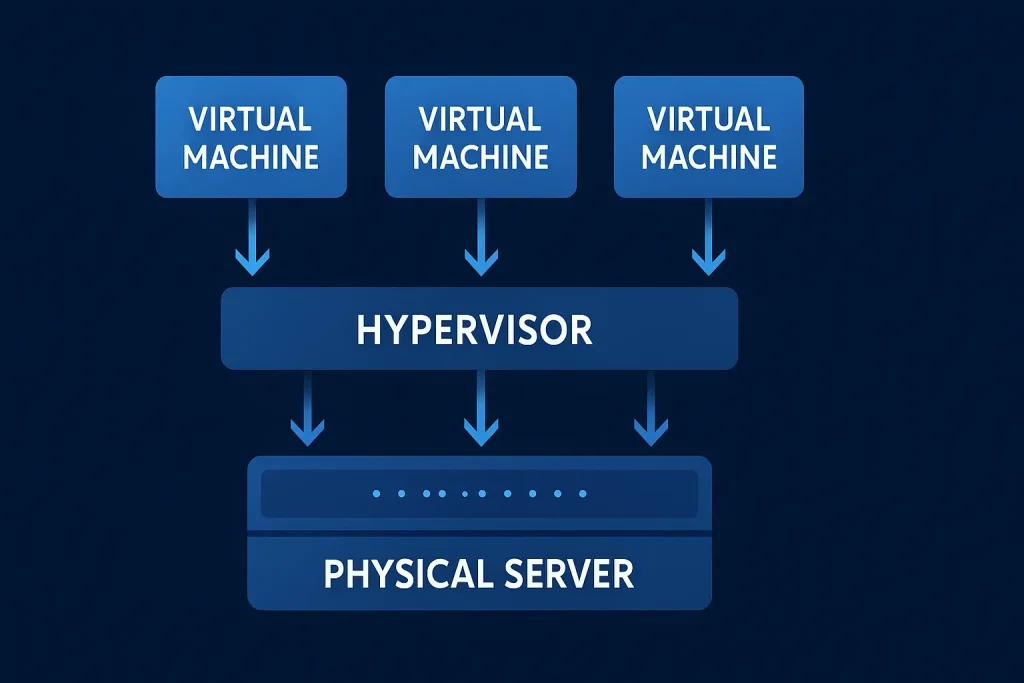
Let’s break it down. The heart of it lies in a layer of software called the hypervisor. It sits between the hardware and the operating systems, managing resources and allocating them to each virtual machine (VM). This allows multiple operating systems to coexist on one physical system—Linux, Windows, or macOS—without conflict.
The main components include:
- Host Machine – The physical computer or server running the virtual environment.
- Guest Machines – The virtual systems created and managed by the hypervisor.
- Hypervisor – The control software that enables resource sharing and isolation.
For example, a company might use this to run development, testing, and production environments on one server instead of three. This flexibility boosts productivity while minimizing infrastructure costs. It’s one of the many ways Innovation turns imagination into real-world solutions.
History of Virtualization
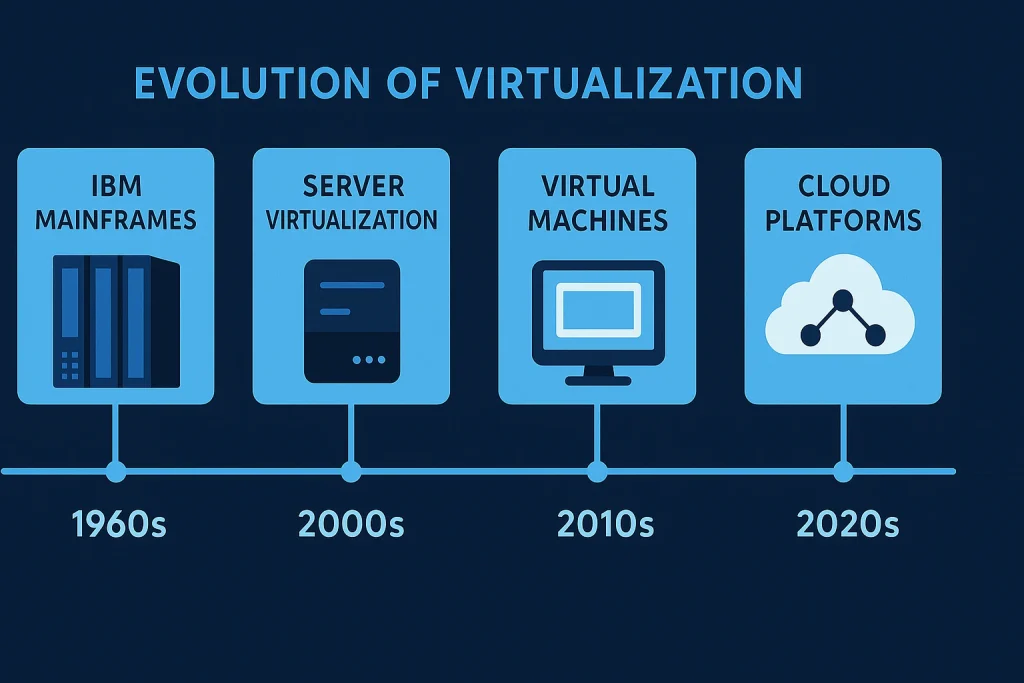
The journey of virtual environment began in the 1960s, long before personal computers became mainstream. It started as a way for large mainframes to divide their processing power among multiple users. Over the decades, it evolved into the backbone of cloud computing and modern IT infrastructure.
| Era | Milestone | Impact |
|---|---|---|
| 1960s | IBM developed early Virtual Machine concepts | Allowed multiple users to share one mainframe |
| 1980s | PC Virtualization experiments began | Led to early forms of software emulation |
| 1990s | VMware and Microsoft advanced Virtualization software | Made Virtual Machines accessible to businesses |
| 2000s–Present | Cloud computing and hybrid environments | Drove massive adoption across industries |
Today, it is more than a tool—it’s a philosophy of digital efficiency. It paved the way for new inventions like serverless computing and containerization, which continue to push the boundaries of what’s possible in technology.
Types of Virtualization
Server Virtualization
This is the most common type, allowing multiple servers to run on one physical machine. It helps businesses reduce hardware costs while improving scalability and uptime. For instance, cloud providers use this form of Virtualization to allocate computing resources efficiently among clients.
Desktop Virtualization
Desktop virtual environment enables users to access their work environments remotely, often through the cloud. It’s ideal for companies supporting remote teams or multiple locations, ensuring consistent performance and security.
Storage Virtualization
In this type, multiple physical storage devices are combined into a single virtual pool. It simplifies data management, enhances performance, and makes scaling storage seamless.
Network Virtualization
This allows the creation of multiple virtual networks within one physical infrastructure. It provides flexibility for managing traffic, improving security, and ensuring optimized connectivity.
Application Virtualization
This focuses on running software applications in isolated environments, separate from the underlying operating system. It’s particularly useful for testing and deploying apps without risking conflicts.
Each of these types serves a distinct purpose, collectively revolutionizing how businesses operate in a fast-paced, data-driven world.
How Does Virtualization Work?
The magic of virtual ecosystem happens through the hypervisor’s ability to split and allocate hardware resources—like CPU, memory, and storage—across multiple virtual environments. Here’s how it works step by step:
- Installation of the Hypervisor – The hypervisor is installed on a physical server or computer.
- Creation of Virtual Machines (VMs) – Each VM is set up with its own operating system and resources.
- Resource Allocation – The hypervisor dynamically divides the hardware’s power based on each VM’s needs.
- Isolation – Every VM operates independently, ensuring that errors or crashes in one don’t affect others.
- Management and Scaling – Administrators can add, remove, or migrate VMs across physical servers with ease.
This process transforms computing from rigid hardware-dependent setups into flexible, software-defined environments. It’s what makes Virtualization a cornerstone of digital transformation in today’s connected world.
Pros & Cons
Before diving into adoption, understanding the strengths and weaknesses of Virtualization is vital. While it offers flexibility and efficiency, it also comes with challenges such as complexity and resource demands.
| Pros | Cons |
|---|---|
| Reduces hardware costs | Requires strong IT management |
| Enhances scalability and flexibility | May cause performance overhead |
| Improves disaster recovery | Licensing can be expensive |
| Supports remote access and mobility | Potential security vulnerabilities |
Despite the drawbacks, the advantages of virtual environment often outweigh the negatives, especially in businesses striving for agility and sustainability.
Uses of Virtualization
Virtualization plays a vital role across industries, driving cost-efficiency, scalability, and innovation.
Cloud Computing
This is perhaps the most prominent use case. Cloud providers like AWS, Azure, and Google Cloud rely on Virtualization to deliver computing resources on demand.
Software Testing and Development
Developers use virtual environments to test applications without interfering with the main system. It allows faster iteration, safer experimentation, and efficient deployment.
Education and Training
Institutions use virtual labs to teach students about operating systems, programming, and server management—without requiring expensive hardware setups.
Business Continuity
Virtual servers make disaster recovery faster and more efficient. Backups can be restored within minutes, minimizing downtime.
Internet of Things (IoT) Integration
Virtualization helps manage the massive data generated by IoT devices, ensuring smooth communication and analytics between systems.
Through these applications, this technology continues to redefine how the world connects, learns, and operates.
Resources
- VMware – What is Virtualization?
- Microsoft Azure – What is cloud infrastructure?
- IBM Cloud – IBM Cloud: AI-ready, secure, and hybrid by design
- Red Hat – Red Hat OpenShift Virtualization
- TechTarget – Virtualization trends in 2022 highlight flexibility, app delivery.
