
When I built my first blog as a college student, I had no clue how the site stored posts, comments, and user data. It just worked—until it didn’t. One day, the comments disappeared. Panic set in. That’s when I first asked myself: What is a relational database? It turned out, the answer was the key to fixing my mess—and understanding the invisible engine behind most apps we use daily.
In the world of data management, a relational database is more than just a tech term—it’s the foundation of everything from banking systems to social media platforms. Whether you’re designing a simple inventory tracker or building the next unicorn startup, knowing how this structure works can save you time, money, and a whole lot of confusion.
What is a Relational Database?
So, let’s get to it: what exactly is a relational database?
At its core, a relational database is a type of structured data storage system that organizes information into tables. These tables—imagine spreadsheets—are made up of rows and columns, and they relate to one another through shared data points.
You might hear it called:
- A table-based data model
- Structured storage system
- SQL-driven data repository
The key feature here is relationships. Unlike a simple list or file dump, this model links data across multiple tables, ensuring consistency, scalability, and logic-based organization.
Breaking Down the Components
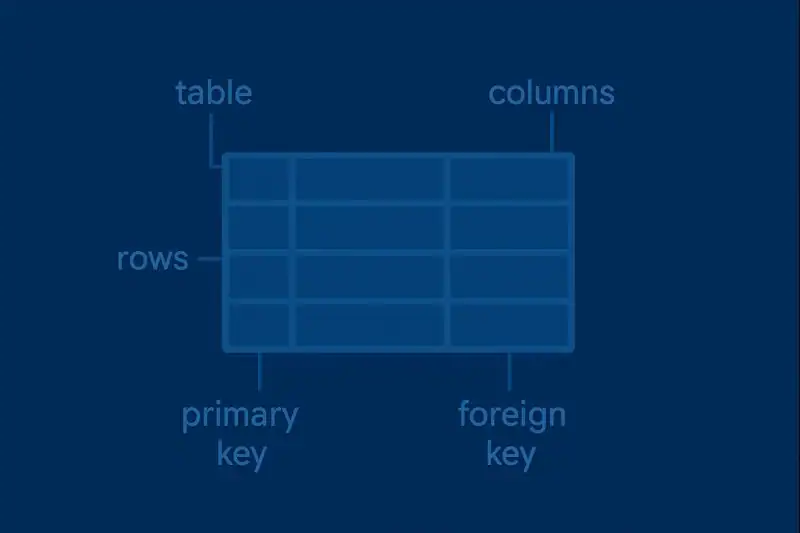
Let’s lift the hood and take a look at what makes it tick.
- Tables: These are your core structures. Each table holds data about a specific entity (e.g., users, products).
- Columns: These define the type of data stored (like email, username, or product price).
- Rows: Each row is a unique entry or record.
- Primary Keys: Unique identifiers for rows within a table.
- Foreign Keys: Connect rows in one table to another, establishing relationships.
- Indexes: Like a book index, these speed up data retrieval.
Example: Think of a simple bookstore. One table stores customer info. Another holds orders. A third contains book details. The customer’s ID links their purchases. That’s a real-world example of this model in action.
History of Relational Databases
This structure didn’t just pop up overnight. It’s the result of decades of research, trial, and technological evolution.
| Year | Milestone |
|---|---|
| 1970 | Edgar F. Codd introduces the relational model at IBM |
| 1979 | Oracle releases the first commercial system based on this model |
| 1986 | SQL becomes the standard query language (ANSI & ISO) |
| 1990s | Microsoft, IBM, and others release powerful RDBMS tools |
| 2000s | Web apps and e-commerce drive widespread adoption |
| 2010s | Integration with cloud and hybrid systems begins |
This evolution reflects how crucial this model became in shaping modern tech infrastructure.
Types of Relational Database Systems
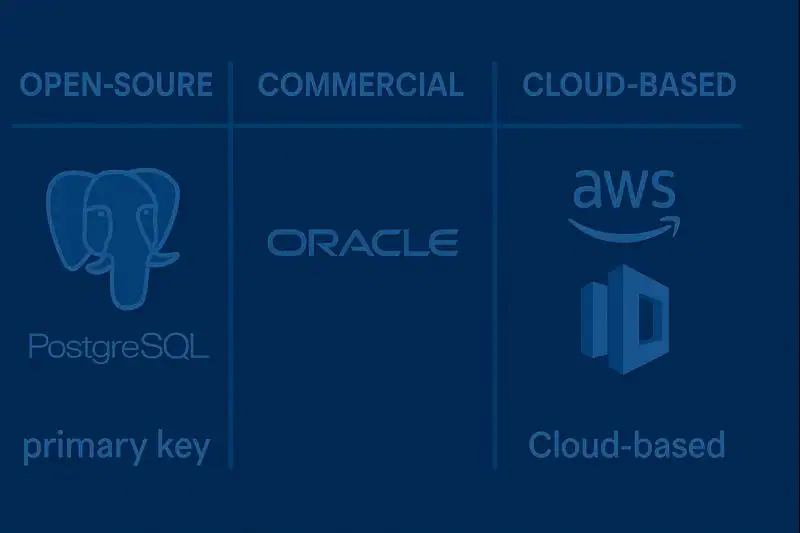
Not all relational databases are created equal. Over the years, developers have crafted different versions to suit everything from scrappy startups to global enterprises. Each version carries its own personality—some prioritize flexibility, others security, and some are built to scale endlessly in the cloud. Picking the right type isn’t just a technical decision—it’s a strategic one that shapes how your application will grow and perform.
While the foundation is the same, there are different implementations based on performance, licensing, and use-case needs.
Open-Source RDBMS
Free and widely adopted by developers and startups. Great for customization and flexibility.
Example: MySQL, PostgreSQL
Commercial RDBMS
Comes with licensing fees but offers high-end features, security, and support. Often used in large-scale enterprises.
Example: Oracle Database, Microsoft SQL Server
Cloud-Based RDBMS
Offered as a service. Scalable and maintenance-free, ideal for modern, agile teams.
Example: Amazon RDS, Google Cloud SQL
How Does It Work?
Imagine you’re running an online store. A user logs in, adds items to a cart, and makes a purchase. Here’s how it unfolds:
- Login: The system searches the “Users” table to authenticate.
- Add to Cart: Products are fetched from a “Products” table.
- Checkout: A new entry is created in the “Orders” table.
- Linking: The order references the customer and product IDs to tie everything together.
This seamless experience is possible because the data is organized, linked, and easily queried through structured relationships.
And the best part? It scales. Whether you have 10 users or 10 million, this setup keeps everything running like a well-oiled machine.
Pros & Cons
Relational databases have been the backbone of digital infrastructure for decades—and with good reason. Their ability to maintain clean, connected, and consistent data makes them a go-to solution for industries that can’t afford mistakes. Imagine a banking system mixing up account balances or a hospital losing track of patient records. Scary, right? That’s why this model’s strength in enforcing structure and accuracy is so invaluable.
But, like any great system, it’s not one-size-fits-all. I once worked on a project involving large sets of user-generated content—images, audio clips, free-text responses. Trying to force that unstructured data into a relational format felt like stuffing a cloud into a shoebox. It worked, but not elegantly. That experience taught me to always consider the trade-offs before choosing a data model.
| Pros | Cons |
| Data integrity through strict relationships | Can become complex to manage over time |
| Easy to scale and maintain with SQL | Not ideal for unstructured data |
| Well-established, proven technology | Requires structured schema |
| Great support from tools and community | Performance can degrade with poorly designed schemas |
Despite a few caveats, the reliability and predictability of this model have made it a gold standard in tech.
Uses of Relational Databases
From apps to analytics, this model powers the systems you use every day.
E-commerce Platforms
Every time you buy something online, you’re interacting with this system. It connects product inventories, user profiles, and order histories.
Banking & Finance
Security, accuracy, and transaction logs are critical. This model ensures every cent is accounted for.
Healthcare Systems
Patient records, prescriptions, and doctor notes all linked and accessible without duplication.
Education Platforms
Track student info, grades, assignments, and schedules across multiple departments.
Enterprise Resource Planning (ERP)
Large corporations manage HR, logistics, and sales with structured systems built on this model.
And yes, even futuristic technology like iot devices often feed data into structured systems before being visualized or analyzed.
Resources
- IBM – What is a Relational Database?
- Oracle – What Is a Relational Database? (RDBMS)?
- PostgreSQL – PostgreSQL Documentation
- Microsoft – What Is SQL Server? – SQL Server
- AWS – Amazon RDS and Aurora Documentation
