
Kubernetes, often referred to as “K8s,” has become a cornerstone of cloud-native delivery. As an open-source container orchestration platform, it streamlines deployment, scaling, and day-2 operations for containerized apps—especially when teams are moving fast and reliability matters. Beyond just “running containers,” it standardizes how services are rolled out, healed, and observed, so developers spend less time firefighting and more time shipping.
Kubernetes also encourages better operational habits: clear ownership of workloads, repeatable releases, and measurable reliability. When paired with sensible defaults—resource requests/limits, health checks, and structured logging—teams can reduce “mystery outages” and make failures easier to diagnose. And because it’s declarative, it fits well with modern delivery approaches where infrastructure and app changes are reviewed like code.
What is Kubernetes?
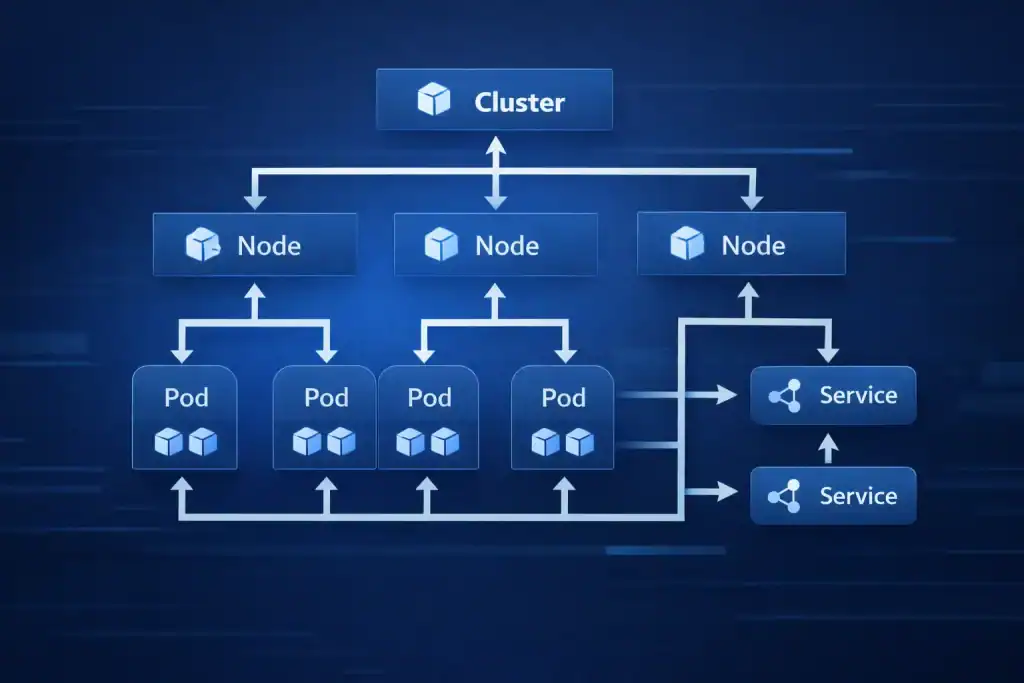
Kubernetes is an open-source system for managing containerized applications across clusters of machines. Originally inspired by Google’s internal scheduling experience, it lets teams declare what they want (for example, “run three replicas”) and then continuously works to keep reality aligned with that intent.
In practical terms, it orchestrates containers—lightweight, portable bundles of code plus dependencies. It can distribute traffic, restart unhealthy workloads, and perform rolling updates so users see fewer disruptions. It also supports configuration and secrets management, which helps separate application code from environment-specific settings. In Kubernetes environments, that separation is a big deal for safer promotions from dev to staging to production.
You’ll also hear it described as “K8s” or a “container orchestration platform.” It fits naturally with DevOps and GitOps workflows, where changes are tracked in version control and applied consistently.
Breaking Down Kubernetes
Key components
To understand how the system delivers reliable orchestration, it helps to know the building blocks:
- Nodes: Physical or virtual machines that provide CPU, memory, and networking.
- Pods: The smallest deployable units; a pod can hold one or more tightly coupled containers.
- Cluster: A group of nodes coordinated to run workloads as a unified system.
- API server: The central interface where requests are validated and persisted.
- Controller manager: Reconciles desired vs. current state (for example, ensuring replica counts).
- Scheduler: Places pods onto nodes based on resources, constraints, and policies.
Add-ons you’ll commonly meet include DNS, ingress controllers, metrics collection, and container networking (CNI) plugins. Together, these pieces form a platform that can scale from a handful of services to thousands—provided you design for observability, security, and cost controls. In K8s, these add-ons are often where “it works on my machine” problems finally disappear.
Why teams rely on it
- Automation: Handles scaling, rollouts, and service discovery with less manual effort.
- Self-healing: Replaces failed pods and reschedules workloads when nodes go down.
- Portability: Runs on-prem, in the cloud, or in hybrid setups with consistent primitives.
- Efficiency: Consolidates workloads and improves utilization when configured well.
Real-world example: Netflix has publicly discussed using container orchestration to support microservices at scale, focusing on resilience and availability.
Origins/History
It has a fascinating history rooted in innovation and necessity.
| Timeline | Event |
|---|---|
| Early 2000s | Google begins experimenting with container technology for internal use. |
| 2014 | Kubernetes is introduced as an open-source project by Google engineers. |
| 2015 | Kubernetes becomes part of the Cloud Native Computing Foundation (CNCF). |
| Present | Widely adopted by companies like Amazon, Microsoft, and Red Hat. |
Its roots trace back to lessons from Google’s “Borg,” influencing how modern teams think about declarative ops, automated recovery, and cluster-level scheduling. As the ecosystem matured, community projects (service meshes, policy engines, and progressive delivery tools) expanded what teams can build on top of it without reinventing core plumbing.
Types of Kubernetes
It implementations can be categorized based on their deployment model:
| Type | Description |
|---|---|
| Managed Kubernetes | Offered by cloud providers like AWS EKS, Azure AKS, and Google GKE. |
| Self-Hosted Kubernetes | Deployed and managed in private or on-premises environments for greater control. |
| Hybrid Kubernetes | Combines on-premises and cloud environments for flexible application deployment. |
Choosing between them often comes down to staffing, compliance needs, and how much operational burden you want to carry. Managed services usually accelerate time-to-value, while self-hosting can be a better fit for strict network segmentation or specialized hardware. Either way, a clear Kubernetes upgrade plan (and testing in a non-prod cluster) prevents painful surprises.
How Does Kubernetes Work?

Kubernetes acts as a control plane that coordinates worker nodes. You describe the desired state using manifests (YAML), and the control plane schedules and maintains workloads to match that state.
A typical flow looks like this:
- Define resources (deployments, services, config maps, and secrets).
- The scheduler assigns pods to nodes with enough resources.
- Controllers monitor status and reconcile drift (for example, replacing unhealthy pods).
- Autoscaling adjusts replica counts based on metrics such as CPU or custom signals—one of the reasons the platform can handle sudden demand spikes.
For smoother operations, teams often add health checks, resource requests/limits, and rollout strategies (like canary or blue/green) to reduce risk during releases. This helps ensure updates are reversible and predictable, even under load. In Kubernetes, those guardrails are the difference between “fast” and “fragile.”
Pros & Cons
| Pros | Cons |
|---|---|
| Streamlined application deployment | Steep learning curve for beginners |
| Built-in scalability | Complex configuration requirements |
| Cross-platform and multi-cloud support | Resource-intensive setup |
| Strong community and ecosystem support | Potential over-engineering for small applications |
Companies Using Kubernetes
Several major companies leverage Kubernetes for its robust container orchestration capabilities:
- Google: Uses it for cloud-native development.
- Spotify: Manages its large-scale streaming services with Kubernetes.
- Airbnb: Ensures high availability and scalability of services.
- Red Hat: Provides OpenShift, a Kubernetes-based platform.
- Shopify: Handles e-commerce traffic spikes efficiently.
Applications or Uses
it plays a critical role across various industries by enabling robust application management and deployment strategies.
In Software Development
Developers use it to build and deploy microservices-based applications. Its automation capabilities reduce the time spent on manual configurations.
In E-commerce
E-commerce platforms like Shopify use it to handle traffic surges during sales events. Its auto-scaling features ensure a seamless user experience.
In Financial Services
Banks and financial institutions adopt it to deploy secure, scalable applications that comply with industry regulations.
In IoT and Edge Computing
Kubernetes enables efficient management of applications in IoT networks and edge computing environments, ensuring low latency and reliability.
Conclusion
It has revolutionized the way modern applications are built, deployed, and managed. By automating container orchestration, it provides businesses with the tools to scale efficiently, ensure application resiliency, and innovate faster. Whether in cloud-native development, e-commerce, or edge computing, it continues to empower industries worldwide with its versatility and robustness.
Resources
