
In today’s fast-moving digital world, staying organized isn’t just helpful—it’s essential. With remote work, hybrid teams, and growing workloads becoming the norm, professionals everywhere are searching for smarter ways to manage time and tasks. This is where ClickUp enters the conversation. As part of modern technology trends, this platform has become a go-to solution for individuals and teams who want clarity instead of chaos.
I first encountered ClickUp during a particularly overwhelming project where deadlines stacked up and communication fell apart. Emails were everywhere, tasks were scattered, and nothing felt under control. Discovering this tool felt like finding a command center for work—everything suddenly made sense. That experience highlights why understanding ClickUp matters today more than ever.
What Is ClickUp?
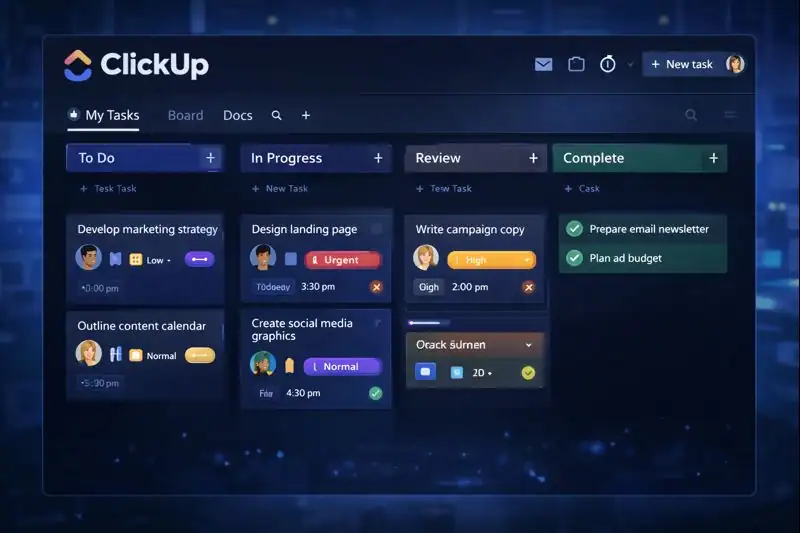
At its core, ClickUp is an all-in-one productivity and project management platform designed to replace multiple workplace tools with a single, unified system. It helps users plan, track, collaborate, and complete work efficiently—all in one place.
Often described as a task manager, collaboration hub, and productivity dashboard rolled into one, ClickUp acts as a digital workspace where projects live, deadlines are visible, and teams stay aligned. Other ways people refer to it include a work management system, productivity software, or team collaboration platform, but all these terms circle back to the same idea: control and clarity.
Breaking Down ClickUp
To truly understand ClickUp, it helps to break it down into its core components. At the highest level, it organizes work into spaces, folders, lists, and tasks. Each task can include due dates, priorities, assignees, comments, attachments, and checklists.
Imagine planning a product launch. Instead of juggling spreadsheets, chat apps, and sticky notes, ClickUp lets you manage everything in one structured flow. You can track progress visually, automate repetitive steps, and customize views based on how you work best. This flexibility is one of the reasons it’s considered part of advanced technology in workplace productivity.
History of ClickUp
The story of ClickUp begins in 2017, when its founders set out to create a single platform capable of replacing multiple productivity tools. Frustrated by switching between apps, they envisioned a unified system that could scale with teams of all sizes.
Since its launch, ClickUp has evolved rapidly, introducing features that reflect changing work habits and the rise of digital collaboration. Its growth mirrors the broader shift toward Innovation in how teams communicate and execute projects.
| Year | Milestone |
|---|---|
| 2017 | ClickUp officially launched |
| 2018 | Custom views and automations introduced |
| 2020 | Major adoption during global remote work shift |
| 2022 | Advanced dashboards and integrations expanded |
| 2024 | Continued refinement for enterprise and SMBs |
Types of ClickUp

While ClickUp is a single platform, it adapts to different needs through its flexible structure and features.
Personal Productivity Use
For individuals, ClickUp functions as a powerful personal task manager. Freelancers, students, and solo entrepreneurs use it to track daily tasks, long-term goals, and recurring responsibilities—all without feeling overwhelmed.
Team Collaboration Use
Teams rely on ClickUp to coordinate projects, assign responsibilities, and maintain transparency. Marketing teams, developers, and designers can all work within the same system while customizing views for their specific workflows.
Enterprise-Level Use
Larger organizations use ClickUp as a centralized work hub. With advanced permissions, reporting, and automation, it supports complex operations and aligns departments under one platform, even when working across regions or time zones.
How Does ClickUp Work?
Using ClickUp starts with creating a workspace, which acts as the foundation for all projects. Inside the workspace, users organize work into spaces that represent departments or major goals.
Tasks are then added and customized with deadlines, statuses, and priorities, making progress easy to track. Collaboration happens directly within tasks through comments and mentions, reducing the need for endless emails.
Automation plays a key role as well. ClickUp allows users to create rules that automatically update task statuses or notify team members, saving time and reducing manual effort. This workflow efficiency reflects how futuristic technology is reshaping productivity.
Pros & Cons
Like any powerful tool, it comes with its share of strengths and trade-offs. For some users, it’s the ultimate productivity solution — flexible, robust, and endlessly customizable. For others, it might feel like too much too soon, especially if all they need is a simple checklist or calendar.
Understanding both the pros and cons of ClickUp is essential before diving in. Whether you’re managing solo projects or leading enterprise-wide operations, this breakdown will help you decide if it’s the right tool to match your workflow style and business needs.
| Pros | Cons |
|---|---|
| Highly customizable workflows | Can feel overwhelming at first |
| Replaces multiple tools | Learning curve for new users |
| Strong collaboration features | Requires setup time |
| Scales from solo to enterprise | Too many features for simple needs |
Despite its complexity, many users find that the benefits of ClickUp far outweigh the initial learning curve, especially as projects grow in size and complexity.
Uses of ClickUp
One of the biggest strengths of ClickUp lies in its remarkable versatility. This isn’t just a task tracker — it’s a dynamic, customizable platform that adapts to a wide variety of professional needs across different industries. Whether you’re managing high-level strategic operations or simply organizing a weekly content calendar, ClickUp can flex to fit your workflow. Below are just a few of the ways it’s being used effectively in the real world.
Project Management
For project managers, it is like a mission control center. It offers a bird’s-eye view of every task, milestone, and deadline—perfect for complex, multi-phase initiatives. Whether you’re overseeing a construction timeline with hundreds of deliverables or coordinating a software launch with strict sprint deadlines, it provides the tools to create Gantt charts, manage dependencies, and keep stakeholders informed at every step.
With features like time tracking, priority labels, and workload views, project managers can not only assign tasks but also prevent team burnout and ensure nothing falls through the cracks. The result? More projects delivered on time, within budget, and with greater transparency.
Marketing and Content Teams
Marketing teams thrive on creativity, but they also live and die by deadlines. That’s why so many content strategists and social media managers turn to website. The platform allows them to map out blog editorial calendars, plan multi-channel campaigns, and visualize all stages of content production — from ideation to publication.
Imagine managing an entire product launch: blog posts, email newsletters, paid ads, influencer collaborations, and social media posts—all organized in a single dashboard. With calendar views, checklists, and comment threads, teams can collaborate in real time and track campaign performance, making it an indispensable tool for creatives who need structure without sacrificing flexibility.
Software Development
In the world of software engineering, managing code is only half the battle — managing people, tasks, bugs, and features is just as important. That’s where it comes in. It’s increasingly being adopted by developers and engineering managers who need to stay organized and communicate efficiently across remote and hybrid teams.
The software platform supports agile methodologies with features like sprint lists, Scrum boards, and burndown charts, but it’s also flexible enough to support non-agile workflows. Developers can create custom fields for user stories, track bug reports, and link tasks directly to GitHub or Bitbucket. This integration of productivity and development tools ensures nothing gets lost between code commits and team discussions.
Operations and Business Planning
Behind the scenes of every successful business are the unsung heroes of operations and strategic planning. These teams often manage the moving parts of an organization — onboarding processes, compliance tasks, procurement pipelines, and internal communications. ClickUp gives operations professionals the ability to centralize all of this in one intuitive space.
It excels at documentation and SOP (Standard Operating Procedure) management. Teams can create templates for recurring workflows, track KPIs through dashboards, and assign responsibilities across departments with crystal-clear accountability. For industries embracing IoT devices and tech-enabled operations, it even allows seamless integration with automation platforms to streamline repetitive tasks.
Resources
- ClickUp – Getting Started Guide
- ClickUp Blog – Productivity and Work Management
- Zapier – How to Use ClickUp Effectively
- Forbes – ClickUp Software Review
- TechRadar – ClickUp Review
